Jellyfin for Android XR & beyond
Turn your headset into a real spatial cinema.
Built XR-first, then folded down to phone and TV from one codebase. Full Space cinema, stereoscopic 3D, spatial audio, an on-device AI voice assistant, anime-grade subtitles that survive casting, and multi-protocol casting (FCast, Google Cast, AirPlay).
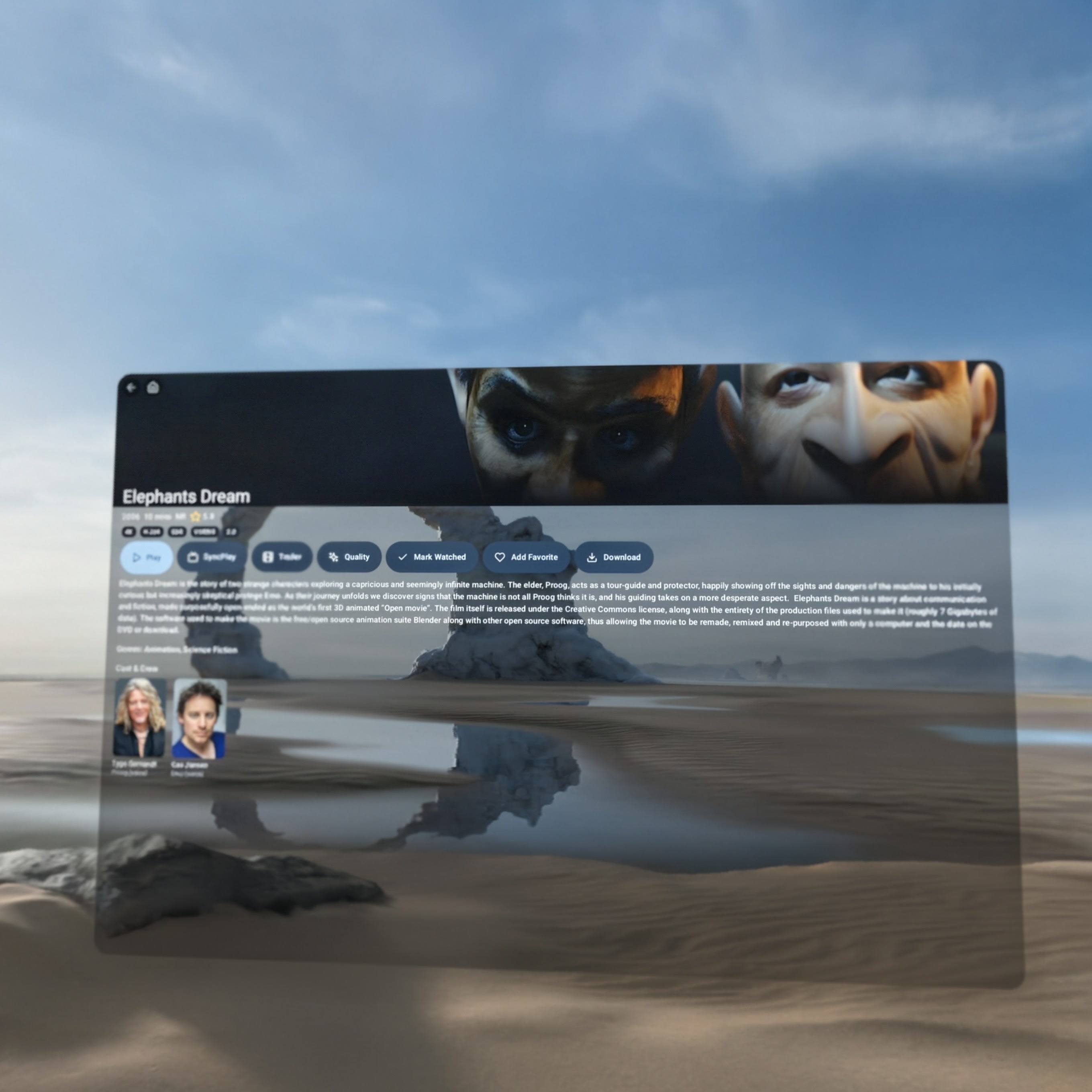
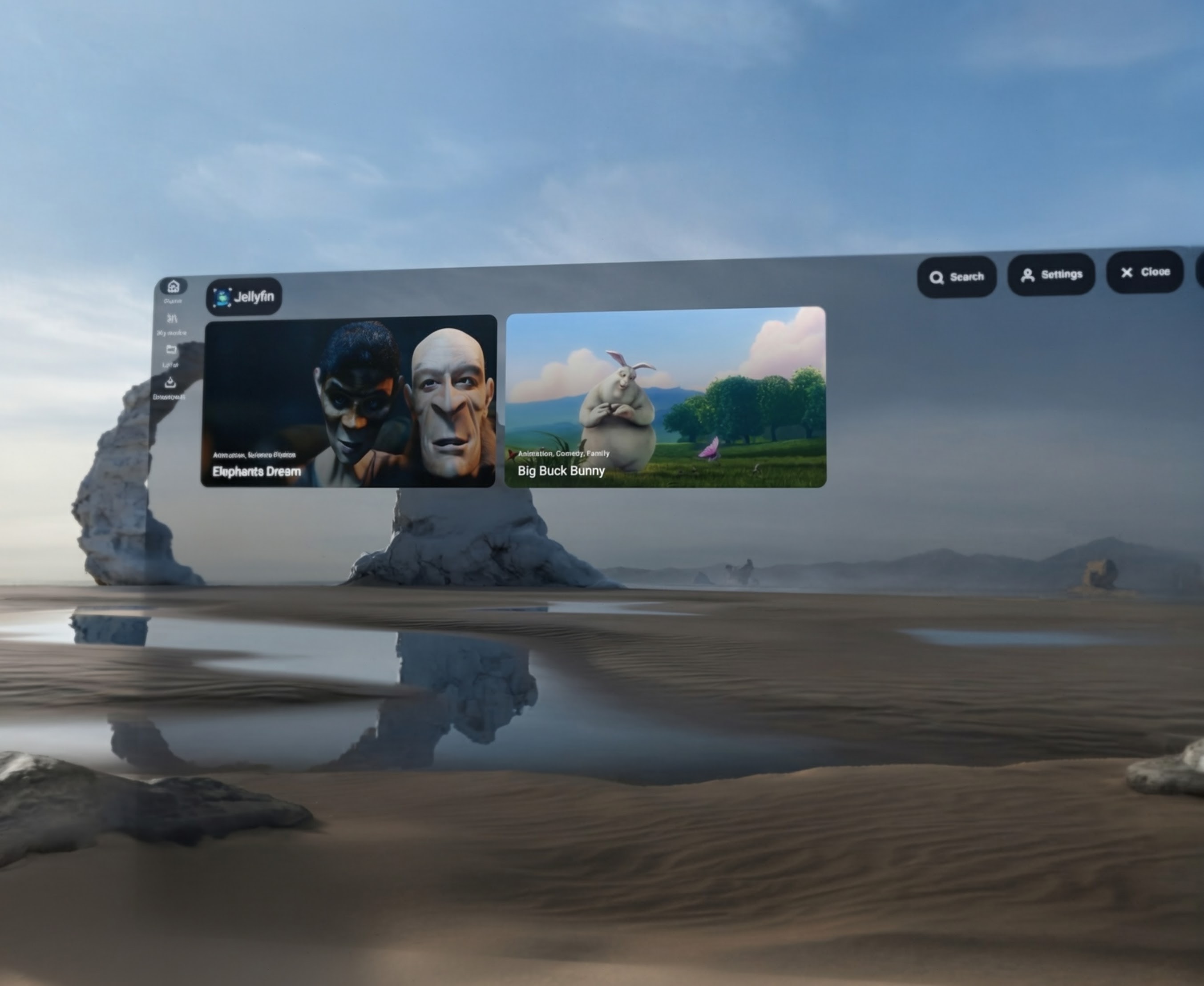
Designed for headset-scale viewing
Full Space Mode, spatial panel placement, and room-scale interactions make the player feel native to XR instead of adapted from a phone UI.
Built for real media libraries
Stereoscopic formats, spatial audio, libass subtitle rendering, bitrate control, version selection, downloads, and local playback are first-class.
Hands-free and social by default
Voice commands, in-player AI search, and native Jellyfin SyncPlay keep playback comfortable whether you are solo, remote, online, or offline.
See it in motion
Watch the SpatialFin trailer
The current build running in Android XR, including the spatial presentation and player experience.
Why SpatialFin
An XR media client that goes deeper than a skin.
Built XR-first and tuned for how media actually feels inside a headset — then the same codebase folds down to a native phone and Android TV experience.
Headset-scale layouts
Massive spatial panels, restored window placement, orbiting controls, and readable action surfaces built specifically for Android XR.
Instant Configuration
Scan a QR code from the Companion App to setup servers and users instantly.
Ask it anything
An open-palm gesture starts a local Gemma assistant that knows the last 60s of subtitles — "what just happened?" works offline, no cloud key required.
Network Shares
SMB and NFS support with automatic discovery and TMDB enrichment.
Smart Playback Engine
Ordered spoken languages, original-audio preference, and series-level memory reduce repetitive track management.
The Full Stack
Everything designed for depth and distance.
Explore the complete technical depth of SpatialFin by category below.
Agency & Placement
- Home + Full Space: Launches in Home Space for side-by-side multitasking; switch to Full Space for a cinematic, theater-scale experience.
- Interactive Agency: Grab and move the entire application or video player window anywhere in 3D space.
- Native XR Controls: Material 3 for XR orbiters float secondary controls in space.
- Persistent Windows: The app remembers where you placed your panels in the room.
Visual Layout
- XR-First Layouts: Larger typography and labeled action buttons instead of dense icon-only controls.
- Large-Target Playback UI: Larger controls and a dedicated chapter picker for easier hand-first interaction.
- Glassmorphic Aesthetic: A UI that feels like it belongs in your physical environment.
- Arrange Your Home: Long-press a row title to move it up or down or hide it; the layout is saved and shared by the XR, phone, and TV homes.
- Browse From Any Detail Page: An episode lists the rest of its season under the cast, so you can hop to the next one without backing out; movies and series end with a "More like this" row from your server. Same rows on XR, phone, and TV.
Visuals & Audio
- Stereoscopic 3D: Automatic detection and rendering of SBS, top-bottom, and other 3D formats.
- Spatial Audio: High-fidelity positional audio that pins sound to the screen's location.
- Pixel-Perfect Subtitles: Integrated
libassJNI renderer for ASS/SSA anime subtitles.
Quality & Selection
- Version Selection: Choose between different versions, such as 3D vs. 2D or 4K vs. 1080p.
- Adaptive Quality: Pick a resolution preset (Auto / 4K / 1080p / 720p / 480p / 360p); Auto steps down when the network can't keep up.
- Smart Language Handling: Spoken-language ordering and subtitle fallback logic.
- Audio Passthrough: Bitstream Dolby Digital, Atmos, DTS and TrueHD to a receiver or soundbar instead of decoding to PCM. Auto by default, with Off and Force on for HDMI chains that misreport.
- Fewer Audio Transcodes: Dolby and DTS tracks with no hardware decoder are decoded on-device by the bundled software decoders rather than re-encoded to stereo by the server.
- Universal Intro & Outro Skipping: 4-tier detection prioritizing server MediaSegments and Intro Skipper plugins, with fallback to legacy endpoints, embedded MKV/MP4/Jellyfin chapter heuristics, and AniSkip crowdsourced anime timestamps.
Assistant Features
- Unified Smart Assistant: Hold an open palm near your face, or use the mic orbiter, for voice commands and natural-language questions.
- Tiered AI Routing: Deterministic parsing first, then on-device LiteRT Gemma, with optional cloud Gemini fallback when you supply your own API key.
- Contextual Awareness: The assistant uses a rolling subtitle buffer and current playback state for accurate clarifications.
- Stateful Follow-Ups: "Shorter," "movie only," "more like the second one" all chain off the previous recommendation.
Feedback & Diagnostics
- Spatial TTS Feedback: The assistant replies aloud with automatic media-volume ducking.
- In-Player AI Search: Voice search opens as a spatial overlay so you never leave playback.
- Voice Telemetry Dashboard: Per-attempt strategy, skill, and outcome are logged locally to make tuning the assistant straightforward.
Watch Parties
- Jellyfin SyncPlay: Native support for creating, joining, and mirroring watch party states.
- Real-time Sync: Seamlessly stay in step with friends regardless of their device type.
- Group Management: Easy group joining directly from the spatial interface.
Ecosystem
- Server Connectivity: Deep integration with Jellyfin for libraries and collections.
- Every Library Type: Home videos, music videos, trailers, and photos are first-class alongside Movies and TV — loose video files play through the normal player, and stills open in a full-screen viewer (pinch-zoom and pan on XR and phone, D-pad paging on TV). Folder-structured libraries browse as their on-disk tree instead of being flattened.
- Seerr Integration: Connect Jellyseerr or Overseerr to search and request media.
- Multi-Protocol Casting: One picker, three protocols — FCast (full v4 with NTP-style clock sync), Google Cast (Chromecast), and AirPlay v1 (Apple TV / AirPlay speakers). SpatialFin↔SpatialFin FCast casts keep native styled ASS subtitles and embedded fonts intact; when a receiver can't render them, SpatialFin transparently switches to a server-side burn-in transcode and tells you, instead of silently dropping the typesetting. As a receiver, an opt-in service accepts inbound media (such as YouTube via compatible apps, or public HLS/DASH URLs) — fetching embedded fonts so inbound anime renders correctly — with optional autopromote into XR Full Space.
- Split-A/V on Galaxy XR: Watch a movie on the headset while the audio plays through a phone, Google TV Streamer, or any SpatialFin-running device on the same Wi-Fi. The XR holds the video master clock; the receiver renders audio after a one-time matched-filter calibration chirp that measures speaker + codec latency. An FCast v4 NTP exchange disciplines a shared clock so both ends can be started already aligned, then a continuous PI drift controller — fed by a freshness-gated beacon and an outlier-rejecting estimator — holds lip-sync over hours instead of bang-bang nudging. Tap Stop on the receiver and the headset unmutes automatically so the movie keeps playing locally — no interruption.
Direct Streaming
- SMB & NFS Support: Stream media directly from network shares without a Jellyfin server.
- mDNS Discovery: Automatically find network shares on your local network.
- Metadata Enrichment: TMDB matching for posters, descriptions, and ratings on local files.
Local Playback
- Local Storage: Browse and play videos stored directly on the XR device.
- HTTP Proxy Bridge: High-performance seek support for network streams.
- Local Resume: Progress and unplayed status tracked per video file.
Downloads
- Resumable Engine: Downloads survive app restarts and network swaps.
- Configurable Options: Choose between original files or smaller transcoded versions.
- Foreground Tracking: Monitor download progress in real-time from the system tray.
Offline Experience
- Automatic Mode: Seamlessly switches to offline library when the server is unreachable.
- Complete Mirroring: Offline items include posters, backdrops, and scrubber thumbnails.
- Smart Cleanup: Automatically reconciles library if files are removed manually.
First-Class Controller
- Full Library Control: Browse, search, and play from your Music Assistant library with a unified interface across XR, phone, and TV.
- Queue Management: Reorder, remove, or jump to tracks in your queue seamlessly.
- Playlist Editor: Create new playlists, add tracks, and manage favorites directly from the app.
- Party Mode: Start or join a collaborative queue and see what's playing in real-time.
Audio Integration
- SendSpin Receiver: Turn your device into a high-fidelity, multi-room synchronized audio endpoint via the native SendSpin receiver service.
- Deep Android Integration: Android MediaSession support brings lock-screen controls, Bluetooth headset compatibility, and native media notifications.
- Optimistic UI: A persistent mini-player and full-screen Now Playing interface respond instantly to input, verified by live WebSocket events.
Fleet Management
- Zero-Type Setup: Configure every detail of the headset from your PC/Mobile browser.
- Multi-User Authentication: Pre-authenticate multiple Jellyfin accounts via username/password.
- Remote Preferences: Set language priorities and AI keys centrally.
Advanced Logic
- Network Share Sync: Direct import of SMB/NFS share details including credentials.
- PWA Support: Install the dashboard as a standalone app for fast access.
- Secure Discovery: unique setup tokens protect your local configuration.
SpatialFin is, to our knowledge, the only Jellyfin client that offers on-device encryption for downloaded media. The feature is off by default — enabling it is a deliberate decision about your threat model.
App Lock Modes
- Off: No prompt on launch. Default state; existing users are never prompted.
- Biometric / device credential: Android
BiometricPromptwithBIOMETRIC_STRONG | DEVICE_CREDENTIAL. When encryption is on, the Keystore key is gated by the biometric prompt viaCryptoObject. - SpatialFin PIN: A 4–8 digit PIN you manage, hashed with PBKDF2-HMAC-SHA256 (600 000 iterations, random salt). The PIN also derives the encryption key — a forgotten PIN is unrecoverable by design.
- Wipe-on-wrong-PIN: Configurable 1–3 attempts, then full data wipe via
ActivityManager.clearApplicationUserData()plus deletion of the downloads folder.
Encrypted Downloads
- AES-256-CTR per file: Each new primary-video download is encrypted at finalize time with a random 16-byte IV. Subtitles and pre-existing downloads stay plain.
- Keystore-wrapped DEK: A random 32-byte data-encryption key, wrapped on disk by a key-encryption key that matches the app-lock mode. Hardware-backed in the Keystore on capable devices.
- DEK in memory only: Decryption happens on-the-fly through a custom Media3
DataSource; the plaintext DEK is zeroed when the app is backgrounded. - Delete unencrypted downloads: A Settings action lists pre-existing plaintext files and removes them in bulk. Re-download to get them encrypted.
Companion Enforcement
- Global or per-device: Administrators can enforce the app-lock mode and encryption setting globally, or per device via the new
devicePreferencesmap in the companion config. - Live push over WebSocket: When the admin changes a preference, the companion broadcasts
config_changedand SpatialFin re-syncs within seconds. - Onboarding step: First-run asks the user to pick an app-lock mode before finishing setup, so security posture is set intentionally.
Threat Model
- Protects against offline file dump of the app's private storage or the
Downloads/SpatialFinfolder — ciphertext is useless without the KEK. - Protects against process-level execution while locked — the DEK is not in memory; unwrapping requires biometric auth or the correct PIN.
- Does not protect against a rooted device actively running SpatialFin with the DEK already in memory, or against streaming playback (only downloaded content is encrypted).
SpatialFin WebXR (Alpha)
- Browser Based: Access the SpatialFin experience directly from your browser without installing the app. This is an early alpha version.
- Built with XR Blocks: Created using XR Blocks.
- Access: Go to spatialfin.martinez.fyi/web to launch the web app.
Connect to Jellyfin
- Direct local HTTP: On Chrome 142 or newer, enter the full LAN URL—such as
http://192.168.1.5:8096orhttp://jellyfin.local:8096—and approve the Local Network Access prompt. - CORS: Add the SpatialFin page's exact origin to Jellyfin's CORS hosts—for this hosted app,
https://spatialfin.martinez.fyi. Typehttp://explicitly; scheme-less addresses remain HTTPS. - Security: Local HTTP leaves credentials, tokens, and media unencrypted. Only use it on a trusted LAN.
- Fallback: If the browser blocks local HTTP, use Jellyfin HTTPS, self-host SpatialFin with its same-origin proxy, or join the browser and server to the same tailnet and run
sudo tailscale serve --bg 8096. Then connect to the resultinghttps://server.tailnet.ts.netURL.
Web App Capabilities & Native Differences
- Offline & PWA: PWA offline caching, in-app video downloads (OPFS & IndexedDB), local video file playback, and standalone offline mode. (SMB/NFS network shares are native Android only).
- Music Assistant & SendSpin: Full Music Assistant library browsing, search, mini-player control, queue management, and SendSpin Web Audio receiver support (auto-configured via Companion setup).
- Companion Sync: QR setup token scanner (auto-configures Jellyfin, Music Assistant & SendSpin), Companion auto-login, FCast casting, and remote receiver mode.
- Audio & Video: Web Audio 5.1/7.1 & Dolby Atmos HRTF spatialization, direct play 4K HEVC/AV1/VP9 (HDR tone-mapped to SDR in WebGL). Dynamic head-tracked audio orientation requires native Android XR.
- Voice & AI: Cloud Gemini AI queries supported; on-device LiteRT Gemma voice control, palm gesture activation, and rolling subtitle context buffer are native Android XR features.
Available Now
Get SpatialFin
SpatialFin is available on the Google Play Store for your Android XR headset, phone, and TV.